A strong personal brand can make all the difference. For influencers, your logo is more than just a visual—it’s the first impression, the symbol that represents your style, personality, and niche. But creating a professional-looking logo can feel overwhelming, especially if you don’t have design experience. CapCut AI Logo Generator tool simplifies the process, allowing influencers to craft unique, eye-catching logos with minimal effort.
Whether you’re building your Instagram aesthetic, YouTube channel identity, or TikTok persona, a memorable logo can set you apart. The best part? You don’t need a design degree or expensive software. With CapCut’s AI-powered platform, your creativity is the limit. Here’s a closer look at how influencers can craft their personal logos using CapCut.
Why Influencers Need a Personal Logo
A logo is more than just an image. For influencers, it’s a representation of your brand identity. It communicates your style, tone, and niche in a single glance. Think about it—some of the most recognizable influencers and content creators are associated with simple, iconic logos that reflect their personality.
A strong logo helps you:
-
Stand Out from the Crowd: In the crowded social media space, a unique logo makes your content instantly recognizable.
-
Create Consistency: Using the same logo across platforms reinforces your brand identity and makes your content more professional.
-
Build Trust: Followers are more likely to engage with creators who appear professional and consistent.
With the CapCut AI Logo Generator, influencers can design a professional logo in just a few minutes, without complicated software or hiring a designer. You can also try CapCut AI Writer to write your social media content.
How CapCut AI Logo Generator Makes Logo Design Easy
CapCut’s AI Logo Generator is designed for simplicity and creativity. It leverages AI to generate designs from your ideas, so you can focus on what truly matters—your brand. You can experiment with different styles, colors, and fonts until your logo perfectly reflects your persona. Unlike traditional design tools, which can be overwhelming for beginners, CapCut’s AI guides you through the process. You don’t need to start from scratch or worry about technicalities. Plus, the platform lets you customize every detail, ensuring your logo feels personal and unique. Plus, once your logo is generated, you can refine it directly in CapCut’s online photo editor—adjusting layouts, backgrounds, and visual details in one seamless workflow without switching tools.
How Influencers Can Craft Personal Logos Using CapCut AI Logo Generator
Creating a personal logo with CapCut is straightforward. Here’s a simplified, influencer-friendly guide to get started:
Step 1: Describe Your Logo Vision
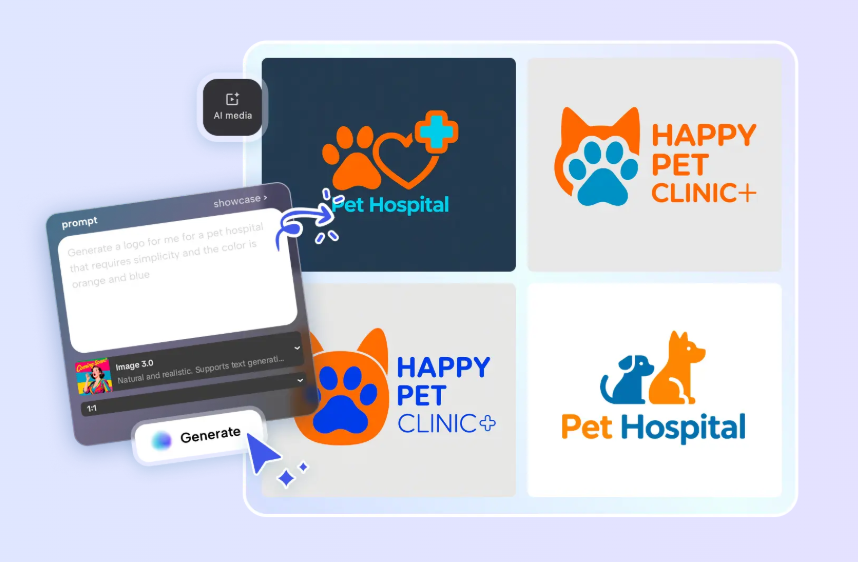
Start by opening CapCut Desktop and creating a new project. Navigate to “AI Media” > “AI Image” to access the AI logo generator. Here, you’ll enter a detailed text prompt describing your logo. This could include your brand name, preferred colors, visual style, or mood. For example, if you’re a travel influencer, you might describe a logo featuring a minimalist globe with pastel tones. If you want a bolder look, you could specify neon colors or futuristic designs.
Pro tip: You can also upload a reference image to guide the AI and clarify your style preferences. The more detailed your description, the closer the AI can match your vision.
Step 2: Let AI Generate Your Logo
Once your prompt is ready, it’s time to let CapCut do its magic. The platform offers several AI generation models, including Nano Banana Pro, Seedream 4.0, Seedream 3.1, and Flux 1.1 Pro. Each model has its strengths—some are ideal for sleek modern designs, while others excel in playful, artistic styles.
Choose the model that best fits your brand identity and click “Generate.” The AI will create multiple logo options based on your prompt. Within seconds, you’ll see several potential logos ready for review. This step is exciting because it allows you to experiment with different styles effortlessly. You can compare multiple versions, pick your favorite, or even generate new iterations until you find the perfect match.
Step 3: Customize and Finalize Your Logo
After generating your logo, you’re not done yet. CapCut offers a suite of editing tools to refine your design. You can:
-
Add your brand name or slogan
-
Adjust fonts, colors, and layouts
-
Insert stickers, icons, or patterns
-
Apply visual effects for a unique finish
This customization ensures your logo is not only professional but also aligned with your personal style. Once you’re happy with the design, export it by clicking the three lines above the editing panel and selecting “Export still frames.” You can choose your desired resolution (up to 8K) and preferred format before downloading.
Conclusion
For influencers, a personal logo is a powerful tool for establishing identity, building credibility, and standing out online. CapCut AI Logo Generator makes the process accessible, fun, and fast. You can go from an idea to a polished logo in just a few clicks, all while maintaining complete creative control.
Whether you’re just starting your social media journey or looking to refresh your brand, CapCut empowers influencers to craft logos that truly represent who they are. With the combination of AI assistance and customization tools, your personal logo will not only look professional but also feel authentically “you.” So why wait? Open CapCut Desktop, experiment with AI-generated designs, and create a logo that leaves a lasting impression on your audience. Your brand identity starts with a simple click—and the possibilities are endless.